



EC2 AMI Watermarks: How to Stop Unapproved Machine Images From Reaching Production
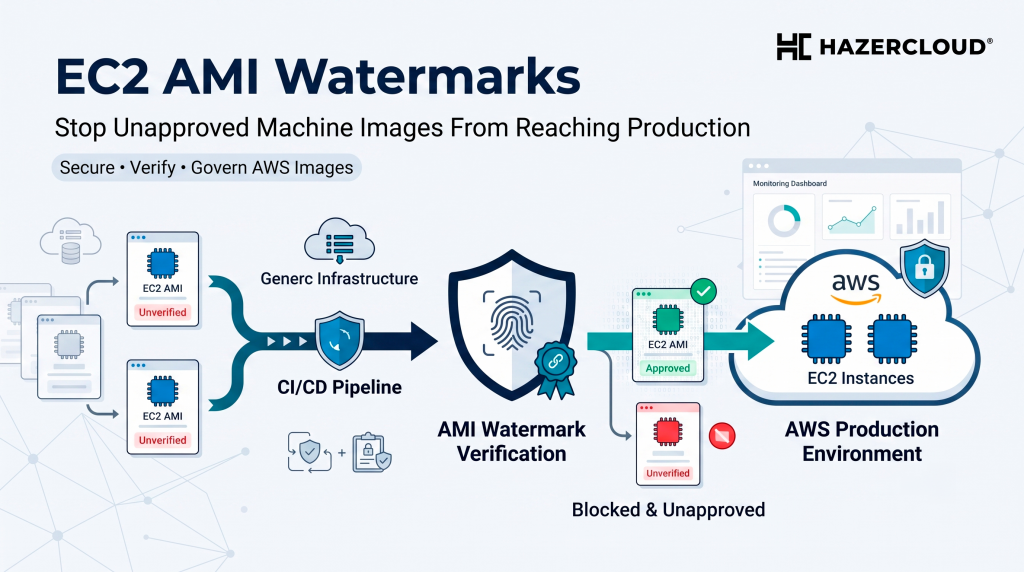
Every business running EC2 has a version of the same quiet problem. Somewhere in your AWS accounts there is an instance launched from an AMI that nobody can fully account for. Maybe it started life as your hardened golden image, then someone copied it to another region, rebuilt it with a few tweaks, shared it to a sandbox account, and six months later it is serving production traffic with no record of where it came from. When an auditor, a customer security questionnaire, or an actual incident asks the simple question of what is running and where it came from, the honest answer at most scale-ups is that nobody is completely sure. This week AWS shipped a feature that closes that gap, and it costs nothing.
The short answer: Amazon EC2 AMI Watermarks, announced by AWS in late June 2026, let you embed custom identifiers in your private AMIs that automatically carry forward to every derived AMI, across copies, regions, and account shares. Combined with the existing Allowed AMIs setting and Declarative Policies, you can now enforce that only instances built from your approved, watermarked images can launch anywhere in your AWS Organization. The feature is available at no additional cost in all AWS regions, so the only investment is a few hours of setup.
Why AMI Sprawl Is a Real Business Risk
AMI sprawl sounds like an internal housekeeping issue until you see how it plays out operationally. A team we worked with had a beautifully maintained golden image pipeline. Packer built a hardened Ubuntu base every two weeks, security patches were baked in, the CIS benchmarks were applied, and everything was tagged. The problem was what happened after the build. Engineers copied the image into other accounts, created new AMIs from running instances during incident debugging, and shared images across the organization to unblock projects. Tags do not survive an AMI copy, so within a year they had over three hundred AMIs across twelve accounts and no reliable way to tell which ones descended from the approved base and which ones were improvised.
That matters for three concrete reasons. First, security posture: an AMI created from a live instance snapshots whatever was on that box, including debug tools, stale credentials in shell history, and unpatched packages. Second, compliance: frameworks like ISO 27001, SOC 2, and Cyber Essentials all expect you to demonstrate control over your build sources, and “we think most instances use the golden image” does not pass an audit. Third, incident response: when a vulnerability like the recent Bitnami ECR withdrawal breaks your supply chain, the first question is which workloads are affected, and you cannot answer it if image lineage is a guess.
What AMI Watermarks Actually Do
A watermark is a custom identifier you attach to a private AMI you own. The key is composed of your twelve digit account ID plus a name you choose, so a watermark is always traceable to the account that created it and cannot be spoofed by another account. Each watermark carries metadata including the source AMI ID, owner ID, region, and creation timestamp. You can attach up to five watermarks to a single AMI, and only the AMI owner can attach them.
The important part is inheritance. When anyone copies a watermarked AMI to another region, shares it to another account, or creates a new AMI derived from it, the watermark carries forward automatically. That is the property tags never had. Your golden image can now be copied and rebuilt a dozen times across your organization, and every descendant still carries the mark that says it came from your approved pipeline. Provenance stops being a documentation exercise and becomes a property of the image itself.
Turning Provenance Into Enforcement
Knowing where an image came from is useful. Preventing launches from images with no approved lineage is where the real value sits. AMI Watermarks integrate with Allowed AMIs, the account level setting AWS introduced in 2024 that restricts which images can be discovered and launched. You can now write watermark filters into your Allowed AMIs criteria, so an instance launch succeeds only if the AMI carries at least one watermark matching your filter list.
The final piece is scale. Through Declarative Policies you can enforce the Allowed AMIs configuration across your entire AWS Organization from the management account, so a new account created next quarter inherits the same rule on day one. Put together, the workflow looks like this: your image pipeline attaches a watermark such as golden-base-2026 at build time, your organization policy says only images watermarked by the platform account may launch, and everything else is refused at the API level. No agent to install, no scanner to run, no per-instance cost.
What to Do About It
Start by taking inventory. Run a report of AMIs in use across your accounts and identify which ones descend from an approved build and which are orphans. Then add a watermark attachment step to your image pipeline, whether that is Packer, EC2 Image Builder, or something homegrown, so every new golden image is marked at creation. Roll out Allowed AMIs in audit mode first, which logs launches that would be blocked without actually blocking them, and use a few weeks of data to find the teams and workloads still using unapproved images. Once the exceptions are resolved, switch to enforcement through a Declarative Policy at the organization level. Finally, treat rebuilds from running instances as the anti-pattern they are, and give engineers a fast path to request changes to the golden image instead.
The teams that get burned by image sprawl are rarely careless. They are busy, and provenance was never enforceable before, so it slipped. Now it is enforceable, it is free, and it takes days rather than months to roll out.
If you want help putting this into practice, from auditing your current AMI estate to building a golden image pipeline with watermarking and organization-wide enforcement, HAZERCLOUD helps growing businesses run secure, well-governed AWS environments every day. Get in touch at hazercloud.com/contact for a free consultation or migration assessment and we will help you work out where your images really come from and how to keep it that way.
