



From One AWS Account to Many: When Your Business Has Outgrown a Single Account
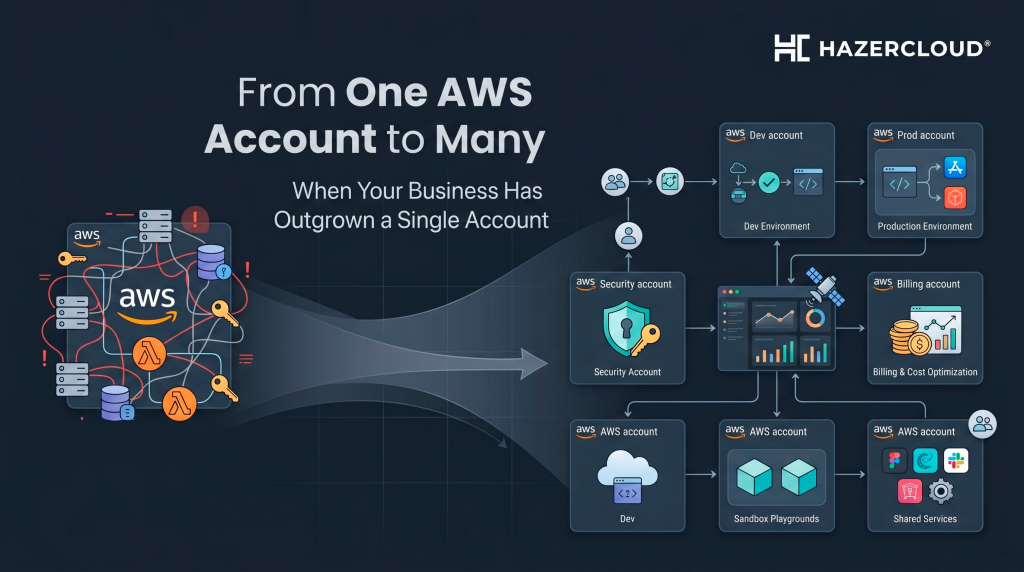
Almost every business on AWS starts the same way. Someone signs up for an account, a few engineers spin up some resources, the workload moves to the cloud, and life is good. Then the company grows. New teams appear, a second product launches, a few enterprise customers ask hard questions about security boundaries, the finance team asks why the bill is impossible to break down, and the original AWS account starts to feel like a flat shared house with twelve people living in it. If any of that sounds familiar, you have probably outgrown a single account and you need an AWS multi-account strategy.
The short answer most business owners are looking for is this. A multi-account setup on AWS means splitting your cloud workloads across several linked AWS accounts under a single management account, using AWS Organizations to govern them and, in most cases, AWS Control Tower to set up and police the structure. It gives you cleaner security boundaries, clearer billing, and faster recovery when something goes wrong. For a growing business on AWS, moving from one account to many is one of the highest-leverage things you can do for security, cost control, and operational sanity.
The Warning Signs You Have Outgrown a Single Account
There is a moment in every growing AWS estate where a single account stops being a feature and starts being a liability. You usually feel it before you can name it. Permissions get tangled because production and development workloads share the same IAM model. A small misconfiguration in one project can take down resources that belong to a completely different team. The monthly bill arrives as one giant number, and nobody can tell you with confidence what marketing spent versus what the platform team spent versus what your three biggest customers cost to serve. Security reviews from enterprise prospects become painful because there is no real blast-radius boundary between their data and everyone else’s. Add a new product line, an acquisition, or a regulated customer in the UK or EU with data residency requirements, and the cracks become canyons.
What an AWS Multi-Account Strategy Actually Looks Like
A modern AWS multi-account strategy is built around three components that work together. AWS Organizations is the parent structure that groups your accounts and lets you apply policy across all of them at once. Organizational Units, often shortened to OUs, are the folders inside that structure, and they typically map to function or environment, with separate OUs for production, non-production, security, shared services, and sandbox. AWS Control Tower is the managed service that sets all of this up for you using AWS best practice, configures a landing zone, and applies guardrails that prevent risky actions across every account automatically.
In a typical setup for a growing business, you might end up with a dedicated management account that does nothing but governance and billing, a log archive account that no human ever touches, a security tooling account for things like GuardDuty and Security Hub, separate workload accounts for production and non-production, and a sandbox account where engineers can experiment without risking anything important. Larger businesses split further by team, product, or region, especially when serving customers across the UK, Europe, and the US who have different compliance expectations.
Why It Matters for Your Business, Not Just Your Engineers
The reason a multi-account strategy is worth doing is not technical elegance. It is risk and money. A misconfigured S3 bucket or a leaked IAM key in a single-account world can expose everything you have on AWS. In a properly structured multi-account world, the blast radius is contained to one account, which is usually one team or one workload. Cost allocation becomes possible without engineering heroics, because every dollar of AWS spend already lives in the account that incurred it, ready to be tagged, charged back, or budgeted against. Compliance conversations get shorter, because you can point to genuine isolation rather than promised policies. And operationally, your engineers stop tripping over each other in a shared sandbox that was never designed to support a real business.
The Bigger Picture
AWS itself now treats multi-account as the default for any serious workload, and the broader industry has followed. Most mature cloud governance frameworks, including those used by regulated UK and EU businesses to meet GDPR, ISO 27001, and SOC 2 obligations, assume an account-level separation of duties. As your business adopts agentic AI on services like Amazon Bedrock, as you spin up environments per customer or per region, and as your AWS spend grows beyond five or six figures a year, the cost of staying in a single account quietly compounds. The longer you wait, the more painful the eventual move, because everything you have built is sitting in the wrong place.
What to Do About It
Start by being honest about where you are. If your AWS bill is meaningful, if you have multiple teams or environments sharing a single account, or if you are about to take on a customer or contract that will care about security boundaries, the time to plan a multi-account move is now, not next year. Begin with a target structure on paper, agree on naming and OU conventions, and stand up a fresh AWS Organization with Control Tower rather than trying to retrofit guardrails onto an old account. Move workloads in waves, starting with the safest non-production environments, and use the move as an opportunity to fix tagging, billing, and IAM at the same time.
This is one of the most common engagements HAZERCLOUD runs for growing businesses across the UK, US, and Europe. We design the target landing zone, set up AWS Organizations and Control Tower against your specific compliance needs, and migrate your existing workloads with no surprise downtime. If your single AWS account has started to feel like a shared house with twelve people in it, Get in touch and we will help you draw the walls.
#AWS Multi-Account Strategy #AWS #AWS Organizations #Cloud Infrastructure
