


Amazon Cognito Now Imports Users With Their Password Hashes: How to Migrate Your Logins Without a Mass Reset
Every auth migration eventually runs into the same wall. You have moved the user records, you have wired up the new sign-in flow, and then someone asks the question that stalls the whole project: what happens to everyone’s passwords. Until this month, moving to Amazon Cognito meant your imported users had to reset their password the first time they signed in. That single requirement turns a backend migration into a customer-facing event, and the numbers on forced resets are ugly. Forrester puts the cost of a single password reset that needs human help at 70 dollars, and Corbado’s analysis of login friction found that 46 percent of US consumers fail to complete a transaction when authentication gets in the way. A migration that forces every user to reset is not a quiet cutover. It is a demand you are making of your entire user base on the worst possible day.
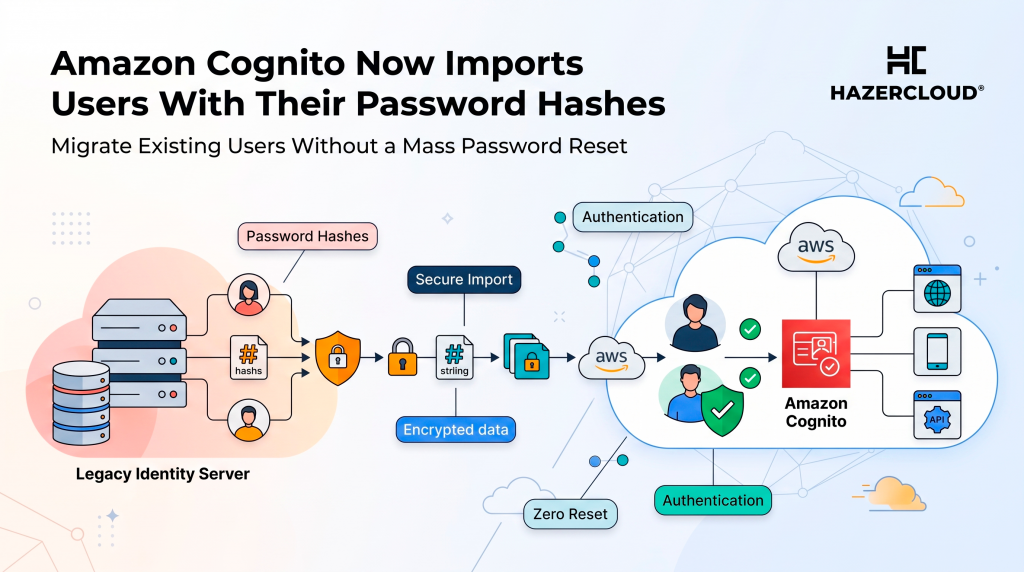
AWS has now removed that requirement. As of July 2026, Amazon Cognito lets you include password hashes directly in a CSV user import, so migrated users sign in immediately with their existing credentials and never see a reset prompt. Cognito supports four hashing algorithms for the import: bcrypt, scrypt, Argon2id, and PBKDF2 with SHA-256. Imported users land in a CONFIRMED state and can log in on day one. If your source database already stores passwords as salted hashes with one of those algorithms, which most modern systems do, you can carry them across without ever seeing the plaintext and without asking a single user to do anything.
What Actually Changed
The Cognito user import tool has existed since 2016, but it always created users who had to set a new password before their first sign-in. That was fine for greenfield projects and painful for real migrations, because the reset step lands on the user, not on you. You could avoid it before only by building a custom migration Lambda that intercepted the first sign-in, validated the old password against your legacy system, and silently created the Cognito credential. That works, but it means keeping your old identity store alive and reachable during a transition window, writing and testing trigger code, and accepting a long tail of users who never come back to trigger the migration at all.
The new capability collapses that. You specify the hashing algorithm when you create the import job, you add the hash and its salt to each row of the CSV, and Cognito stores the credential as-is. There is no plaintext handling, no legacy system left running to answer first-login checks, and no reset email campaign. The migration becomes what it should have been all along: a data move that your users never notice.
Why a Forced Password Reset Is Not a Small Ask
The instinct on many teams is that a reset is a minor inconvenience, a single email and a two-minute detour. The data says otherwise, and it says so consistently across sources that measure it from different angles. The table below pulls the headline figures on what login friction and forced resets actually cost, both to your help desk and to your conversion rate.
| Metric | Figure | Source |
|---|---|---|
| Cost of a single password reset needing human help | 70 dollars | Forrester, via HYPR and Keystone |
| Average firm’s annual spend on setting and resetting passwords | 5.2 million dollars | HYPR |
| Share of help desk calls that are password related | 40 percent | Gartner, via HYPR and Keystone |
| US consumers who fail to complete a transaction due to auth failure | 46 percent | Corbado |
| Users who abandon a cart because they forgot their password | 19 percent | Corbado |
| Users who would abandon if a new password cannot match an old one | roughly 50 percent | Corbado |
| Consumers who cite login frustration as a reason to abandon entirely | 60 percent | Corbado |
| Reset rate that signals password fatigue is hurting conversion | above 10 percent of login attempts | Corbado |
Read those figures in the context of a migration and the risk becomes obvious. A forced reset does not spread the friction out over a year. It concentrates it into the days right after your cutover, when every returning user hits the reset wall at once. Some fraction of them will not bother. Corbado’s threshold is worth remembering here: once your reset rate climbs above 10 percent of login attempts, you are looking at password fatigue that is actively suppressing conversion, and a mass migration reset can push you well past that line overnight. The users who quietly stop coming back are the expensive part, because you rarely see them leave. They just do not return, and the churn shows up later as a soft dip you cannot cleanly attribute.
There is a second cost that lands on your own team. Gartner’s long-standing estimate that 40 percent of help desk calls are password related is not abstract during a migration. If even a small share of your user base struggles with the reset, your support queue absorbs it, and each ticket that reaches a human carries that 70 dollar Forrester price tag. HYPR’s figure that the average firm spends 5.2 million dollars a year on setting and resetting passwords is the steady-state version of the same problem. A botched migration is that cost, compressed and spiked.
What the Hash Import Actually Supports
The mechanics are deliberately narrow, which is a good thing for something touching credentials. You create a user import job, tell Cognito which algorithm produced your hashes, and upload a CSV where each user row carries the password hash and the salt used to generate it. The four supported algorithms, bcrypt, scrypt, Argon2id, and PBKDF2 with SHA-256, cover the overwhelming majority of what a modern application will have in its user table. Cognito validates the incoming credential against that algorithm at sign-in, so the user’s existing password just works.
The important security property is that you never move plaintext. You are moving one-way hashes, which is exactly what a well-built system already stores. If your legacy database keeps passwords in bcrypt, and it very likely does, you export the hash and salt, drop them into the import, and you are done. Imported users are CONFIRMED, meaning they are fully active and can sign in without any additional verification step. That is the whole point: the credential travels, the user experience does not change, and no reset email ever goes out.
Where This Fits in a Real Migration
The hash import does not remove the parts of a Cognito migration that were always the real work. You still have to map your existing user attributes to a Cognito user pool schema, decide how you handle multi-factor enrollment, plan for federated and social sign-ins separately, and rehearse the cutover. Cognito’s free tier of 10,000 monthly active users per month gives you room to stand up a parallel pool and test the import against real exported data before you touch production, and you should use it. Run the import against a copy, sign in as a sample of migrated users with their real passwords, and confirm the hashes validate before you commit to a date.
What the hash import removes is the single most user-hostile step, and that changes how you sequence the project. Without it, teams often stage a migration precisely to soften the reset blow, drip-migrating cohorts or timing the cutover for a low-traffic window to keep the reset surge manageable. With it, the credential move is invisible, so you can cut over cleanly and spend your migration-window energy on the things that genuinely need care, like MFA re-enrollment and token lifetime differences, rather than on damage control for a reset campaign you should never have had to run.
One honest caveat: if your legacy system uses a hashing scheme that is not one of the four supported algorithms, or a heavily customized variant, the import will not accept it, and you are back to a migration Lambda that validates against the old system on first sign-in. That path still works and is well documented, but it carries the operational weight the import was designed to avoid. Check your actual hashing scheme before you assume the easy path is open to you.
What to Do About It
If you are already on Cognito, there is nothing to do. This is a new capability for imports, not a change to existing users. If you are planning a migration to Cognito, the first move is to confirm which algorithm your current system uses to hash passwords and whether it is bcrypt, scrypt, Argon2id, or PBKDF2 with SHA-256. That one fact determines whether your migration can be silent or whether it needs a first-login trigger. From there, export a representative sample, run it through an import job against a test user pool inside the free tier, and verify that sample users can sign in with their real passwords. Treat the credential import as the easy part it now is, and put your rehearsal time into attribute mapping, MFA, and the cutover runbook.
If any of that sounds like more moving parts than you want to own, that is exactly the kind of migration HAZERCLOUD handles. We plan and run AWS identity and platform migrations that your users never feel, from mapping a legacy user store to a Cognito pool to rehearsing the cutover so nothing surprises you on the day. Book a free migration assessment at https://hazercloud.com/contact/ and we will tell you honestly whether your password hashes can travel silently or whether you need a first-login bridge, before you commit to a date.
